Ariens Deluxe 24 921069 Won't Move: Traction Drive Checks
A traction-only diagnostic path for a running 921069 that will not drive forward or reverse.
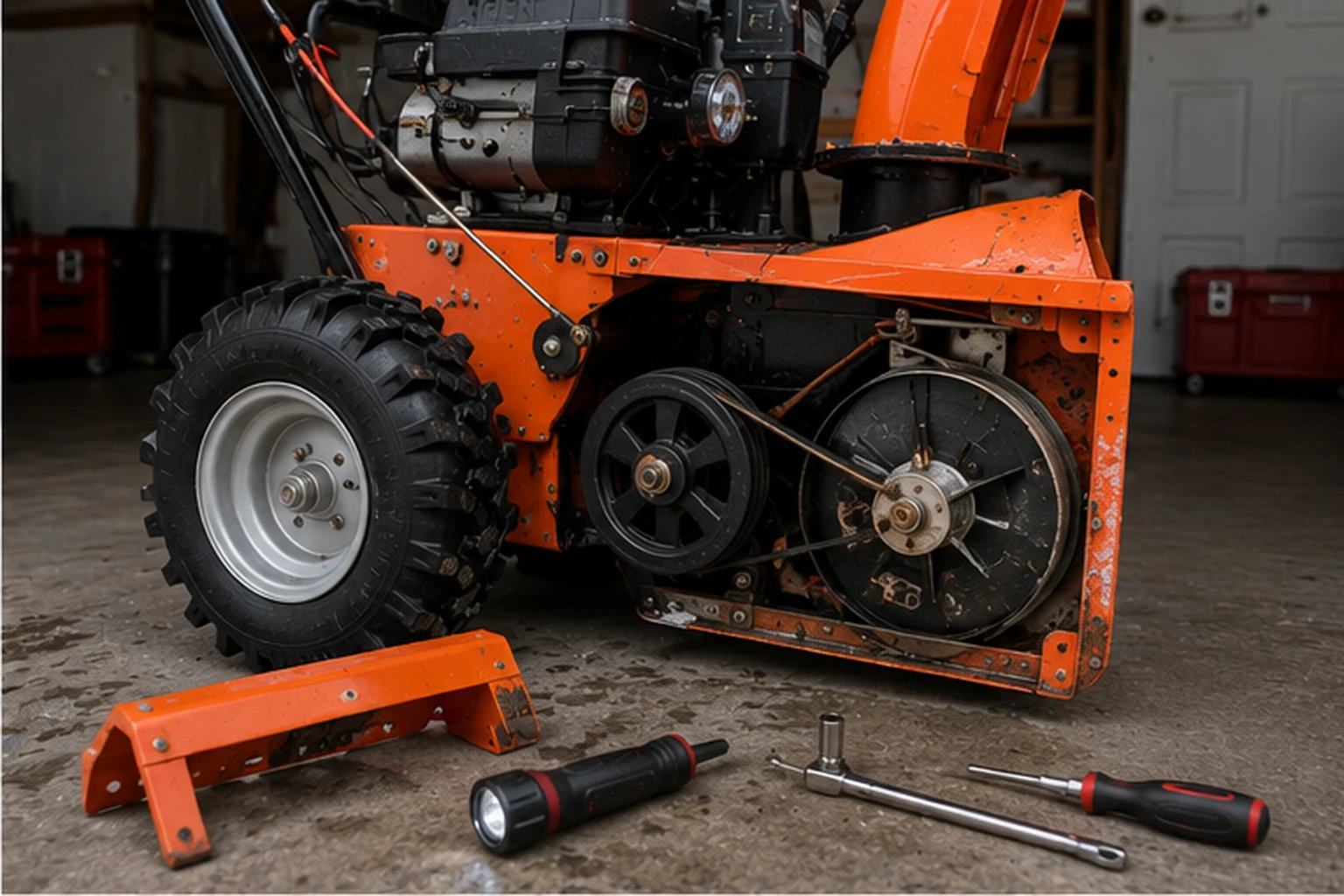
Applies to Deluxe 24 (921069)
Identifiers: 921069 · Deluxe 24
Engine ID: Ariens AX 252cc current specification — verify engine label for parts
Guide scope: Applies to Ariens model 921069, serial 000101+, under operator manual 30219300A.
Operator manual 30219300A identifies model 921069 serial 000101+. Current Ariens product data lists AX 252cc; keep the serial number and engine label with the machine before engine-specific parts.
Treat this as a traction-drive problem, not an auger problem. Verify clutch/cable response before opening the friction-drive system.
Stop the engine and remove the key before inspecting under covers. Keep oil and grease off the friction disc, friction plate and belts.
Diagnostic sequence
Work in order. The early checks are intentionally low-disassembly and model-specific; stop once the symptom changes or the fault is confirmed.
Speed selector position
Why this check: A selector between detents can look like a drive failure.
What to do: With the machine stopped, select a clear forward speed and retest.
Traction clutch cable
Why this check: The manual provides a specific traction-drive clutch adjustment procedure.
What to do: Check for excessive slack, damaged cable housing or a lever that does not load the mechanism.
Friction-drive area
Why this check: The Deluxe uses a Disc-O-Matic friction drive; contamination or wear changes traction.
What to do: Only inspect after shutdown and cover removal per service procedure. Do not lubricate the friction surfaces.
Belt/drive service
Why this check: If cable travel is correct but the drive plate is not transmitting power, deeper service is required.
What to do: Use the Ariens service manual or dealer rather than adjusting stop bolts by guess.
How to read this symptom on this model
Traction and snow-throwing are separate systems on this machine. If the auger works but the wheels do not pull, that observation actually helps: it shifts attention toward the speed selector, traction clutch cable, traction belt and friction-drive area instead of the attachment clutch. Ariens lists those same four branches in the 30219300A troubleshooting table for a 921069 that will not drive forward or reverse.
Start by recording the pattern rather than only “won’t move.” No forward and no reverse suggests a common traction-drive problem. One direction or one group of speeds behaving differently gives the speed-selector linkage more weight. A machine that creeps on level ground but slips under snow load can fit friction-disc or belt transfer better than a selector that is simply between positions.
The current manual specifically says to release the traction lever before changing speed. If the selector was shifted while loaded or recently adjusted, verify the selector linkage before treating the friction disc as failed. Ariens provides a speed-selector adjustment that is checked by testing first forward and first reverse positions after the linkage is aligned.
The traction clutch has its own adjustment. Ariens says that when the unit does not drive correctly, traction-clutch adjustment can compensate for friction-disc wear: the cable adjustment barrel is used to remove slack, and with the traction clutch disengaged the drive plate should touch the stop bolt. That is a controlled adjustment, not permission to keep shortening the cable until the machine moves.
Friction-disc wear has a useful visual nuance. The manual says small rubber beads collecting in the frame can be normal wear; chunks or large pieces are the condition that points toward repair. That prevents normal rubber residue from being treated as proof that the friction disc must be replaced.
The stop behavior is part of diagnosis too. Ariens says the wheels or tracks must stop quickly when the traction-drive clutch lever is released. If the machine moves but continues to pull after release, the problem is no longer simply “needs more engagement.” Over-adjustment, binding or another clutch fault must be corrected before normal use.
Forward and reverse behavior should be compared before opening the friction-drive area. If one direction works while another does not, the selector/linkage branch deserves attention before a friction-disc replacement. If every speed fails but the traction lever has obvious slack or limited travel, cable engagement moves higher on the list. A friction disc becomes stronger evidence when selector position and cable travel are credible yet the drive still slips under load with the engine running normally.
Keep the friction surfaces dry. Ariens’ Disc-O-Matic drive depends on friction between the wheel and plate, so oil or grease can create exactly the slipping symptom an owner is trying to fix. If the lower cover is removed for inspection, look for contamination, chunks or abnormal wear without lubricating the disc or plate. After any confirmed correction, restore the cover and test a low forward speed and reverse on level ground before returning to normal snow load.
Use the release behavior as a safety check after any traction adjustment. The traction system should engage strongly enough to move the machine, but the wheels also need to stop driving promptly when the clutch lever is released. If more cable tension restores motion but creates creep or delayed release, undo that assumption rather than accepting the new symptom. A correct result is normal engagement plus clean disengagement; if those two conditions cannot be achieved together, the matched Ariens service procedure is a better next step than continuing to shorten the cable.
Selector behavior can narrow the Disc-O-Matic branch before the lower cover comes off. With the engine off and the machine secured, move the speed selector positively into several detents and note whether the linkage reaches each position cleanly. A machine that suddenly regains one direction or one speed after the selector is fully seated does not present the same evidence as one that has no traction anywhere with normal selector travel. Keep that distinction through the powered retest. It can prevent a friction-wheel replacement from being used to solve a linkage-position problem, and it gives a service technician a much more useful starting point if the owner-level checks do not restore drive.
Before you order parts
Confirm the selector is fully in a drive position and note whether any speed works. Then inspect cable response and obvious drive-belt condition before treating the friction wheel as the default culprit. If the machine was recently serviced, also consider whether an adjustment is preventing full engagement.
Use the four manual-listed branches as a parts gate: friction disc, traction-drive cable adjustment, traction belt and speed-selector adjustment. If one direction works, test the selector/linkage before buying a friction disc. If cable slack is obvious, use the matched adjustment. If the cable and selector are correct but the drive slips under load, the friction/belt path becomes more credible.
Keep oil and grease away from the friction disc, friction plate and belts. Lubricating a slipping friction drive is the opposite of the intended repair and can contaminate multiple parts. If the bottom cover is removed for inspection, restore it before powered testing and follow the service-position procedure rather than working under an unsupported machine.
Do not replace the friction disc simply because there are a few rubber beads in the frame. Ariens explicitly treats small beads as normal wear unless chunks or large pieces are present. A replacement decision should combine visible condition with the drive symptom and the external cable/selector checks.
Back to the exact model hub →Retest without creating a second problem
With guards restored, test first forward on a level open surface, release the traction control and confirm the machine stops driving quickly. Stop the machine before moving the selector to first reverse, then test reverse. This mirrors the manual’s selector-adjustment verification and keeps direction changes controlled.
If both directions now work, test one additional forward speed and then a short light-snow pass. Do not use heavy snow as the first proof because a marginal friction/belt condition may only show under load; the staged test tells you exactly when the symptom returns.
If engagement is intermittent or the machine continues to pull after release, stop and correct the traction-control condition before snow use. A repair that restores motion but compromises disengagement fails the manual’s clutch-operation check and should not be accepted.
Make sure this is the right symptom
If your machine is showing an adjacent symptom instead, switch paths before changing parts: pulls left or right.
The same search phrase can lead to a different branch on another machine. Compare the nearest model-specific examples: Troy-Bilt Storm 2410 family: won't propel · Cub Cadet 2X 24 IntelliPOWER (31AM5HVRB10): won't propel.
Model-specific notes
- Small rubber beads can be normal friction-disc wear; chunks or large pieces warrant service according to the manual.
- Drive and attachment clutches are separate. A working auger does not prove the traction system is healthy.
Questions people get wrong on this model
Can I spray lubricant on the friction disc?
No. Ariens explicitly warns not to allow grease or oil on the friction disc, friction plate or belts. Use the four manual-listed branches as a parts gate: friction disc, traction-drive cable adjustment, traction belt and speed-selector adjustment. If one direction works, test the selector/linkage before buying a friction disc.
Why does it move in one speed but not another?
That points more toward selector/drive adjustment or friction-drive geometry than a total engine failure. Confirm the selector is fully in a drive position and note whether any speed works. If the cable and selector are correct but the drive slips under load, the friction/belt path becomes more credible.
Do a few rubber beads under the friction drive mean the friction disc must be replaced?
Not by themselves. Ariens notes that small rubber beads can be normal friction-disc wear; chunks or large pieces are the stronger service clue. Combine visible condition with selector, cable, belt and load behavior before ordering a friction disc. Do not replace the friction disc simply because there are a few rubber beads in the frame.
Primary-source trail
Manufacturer material used for this diagnosis. Verify the model/serial range before ordering parts or applying an adjustment.
Ariens Deluxe Series Operator Manual 30219300AModels 921069–921072; troubleshooting and adjustment tables.apache.ariens.com →Ariens Deluxe 24 current product page — model 921069Official current Deluxe 24 page identifies model 921069 and the current Ariens AX 252cc specification.www.ariens.com →Ariens manuals lookupOfficial model-and-serial manual resolver. Use it as the stable path if a deep PDF URL changes.www.ariens.com →